Problem Statement
Many modern web applications help users create and manage automated workflows. However,
users often struggle with:
Too many configuration steps
Unclear system feedback
Confusing terminology
Low confidence about whether things are set up correctly
Design a simple, intuitive workflow setup experience that helps users
confidently create and activate a workflow.
Many modern web applications help users create and manage automated workflows. However,
users often struggle with:
Too many configuration steps
Unclear system feedback
Confusing terminology
Low confidence about whether things are set up correctly
Design a simple, intuitive workflow setup experience that helps users
confidently create and activate a workflow.
Overview
Most workflow tools have a steep learning curve. Users struggle with too many configuration steps, technical language, and low confidence about whether their workflow is set up correctly. This often leads to drop-offs before completion.
Most workflow tools have a steep learning curve. Users struggle with too many configuration steps, technical language, and low confidence about whether their workflow is set up correctly. This often leads to drop-offs before completion.
Design Vision
I wanted to build a “Canva for Workflow Creation” experience.
Just like Canva simplifies graphic design, this solution simplifies automation by:
Reducing complexity
Using natural, simple language
Letting AI guide the user instead of forcing them to learn the system
The goal was to make workflow creation feel intuitive, visual, and confidence-driven.
I wanted to build a “Canva for Workflow Creation” experience.
Just like Canva simplifies graphic design, this solution simplifies automation by:
Reducing complexity
Using natural, simple language
Letting AI guide the user instead of forcing them to learn the system
The goal was to make workflow creation feel intuitive, visual, and confidence-driven.
Key Insight
After exploring existing tools like Zapier and Make, I observed that:
They are powerful but cognitively heavy
Users must understand workflows before they can build one
The burden of “thinking” is on the user
My approach shifts that burden to the system using AI and templates.
After exploring existing tools like Zapier and Make, I observed that:
They are powerful but cognitively heavy
Users must understand workflows before they can build one
The burden of “thinking” is on the user
My approach shifts that burden to the system using AI and templates.
Core Approach
AI + Templates + Visual Building Blocks
AI + Templates + Visual Building Blocks
“What do I want to achieve?”
The system:
Understands the problem through AI chat
Asks simple, guided questions
Suggests ready-made approaches
Pre-builds a workflow template
Asks the user only to connect their accounts and finalize
This reduces user effort and decision-making by nearly 50%.
“What do I want to achieve?”
The system:
Understands the problem through AI chat
Asks simple, guided questions
Suggests ready-made approaches
Pre-builds a workflow template
Asks the user only to connect their accounts and finalize
This reduces user effort and decision-making by nearly 50%.
Context & User Story
Our primary users are Gen Z founders, creators, and small brand owners who run their businesses through social media.
They are:
Fast-paced
Visual-first
Used to tools like Canva, Notion, and ChatGPT
Comfortable with AI, but impatient with complex systems
For one such brand, social media is their business.
Most customer conversations, leads, feedback, and complaints happen on platforms like Instagram, LinkedIn, and X.
Today, this entire system depends on one person.
Someone has to:
Open each platform
Scan every mention
Read and understand each post
Decide if it’s important
And manually assign tasks to the team
It’s slow.
It’s repetitive.
And it’s easy to miss something critical.
So,
How might we turn chaotic social media activity into a clear, reliable workflow that runs on its own?
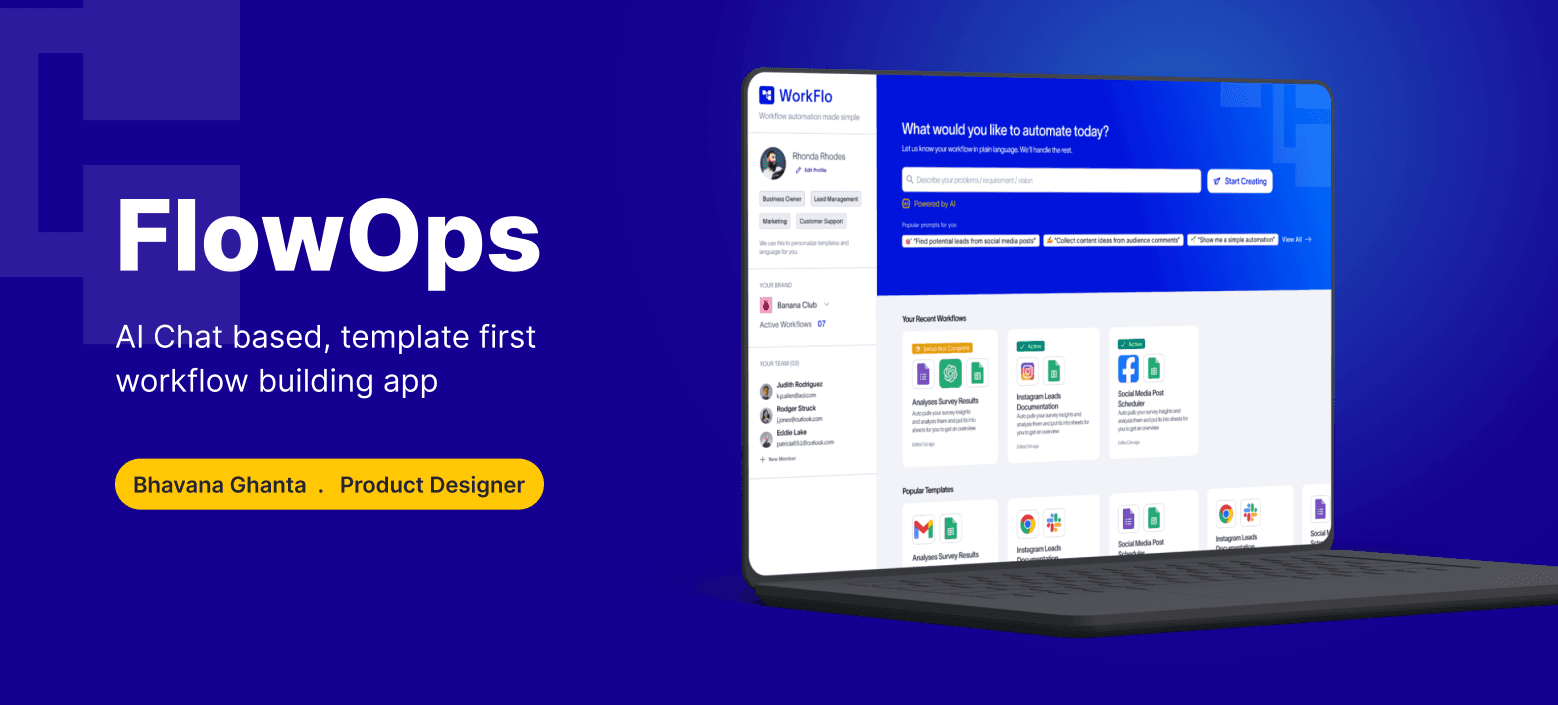
This is the exact gap FlowOps was designed to fill.
Our primary users are Gen Z founders, creators, and small brand owners who run their businesses through social media.
They are:
Fast-paced
Visual-first
Used to tools like Canva, Notion, and ChatGPT
Comfortable with AI, but impatient with complex systems
For one such brand, social media is their business.
Most customer conversations, leads, feedback, and complaints happen on platforms like Instagram, LinkedIn, and X.
Today, this entire system depends on one person.
Someone has to:
Open each platform
Scan every mention
Read and understand each post
Decide if it’s important
And manually assign tasks to the team
It’s slow.
It’s repetitive.
And it’s easy to miss something critical.
So,
How might we turn chaotic social media activity into a clear, reliable workflow that runs on its own?
This is the exact gap FlowOps was designed to fill.
High-Level Flow
Problem Input
User describes their need in natural language.
Example: “I want to track posts where my brand is tagged and assign complaints to my team.”
AI Conversation
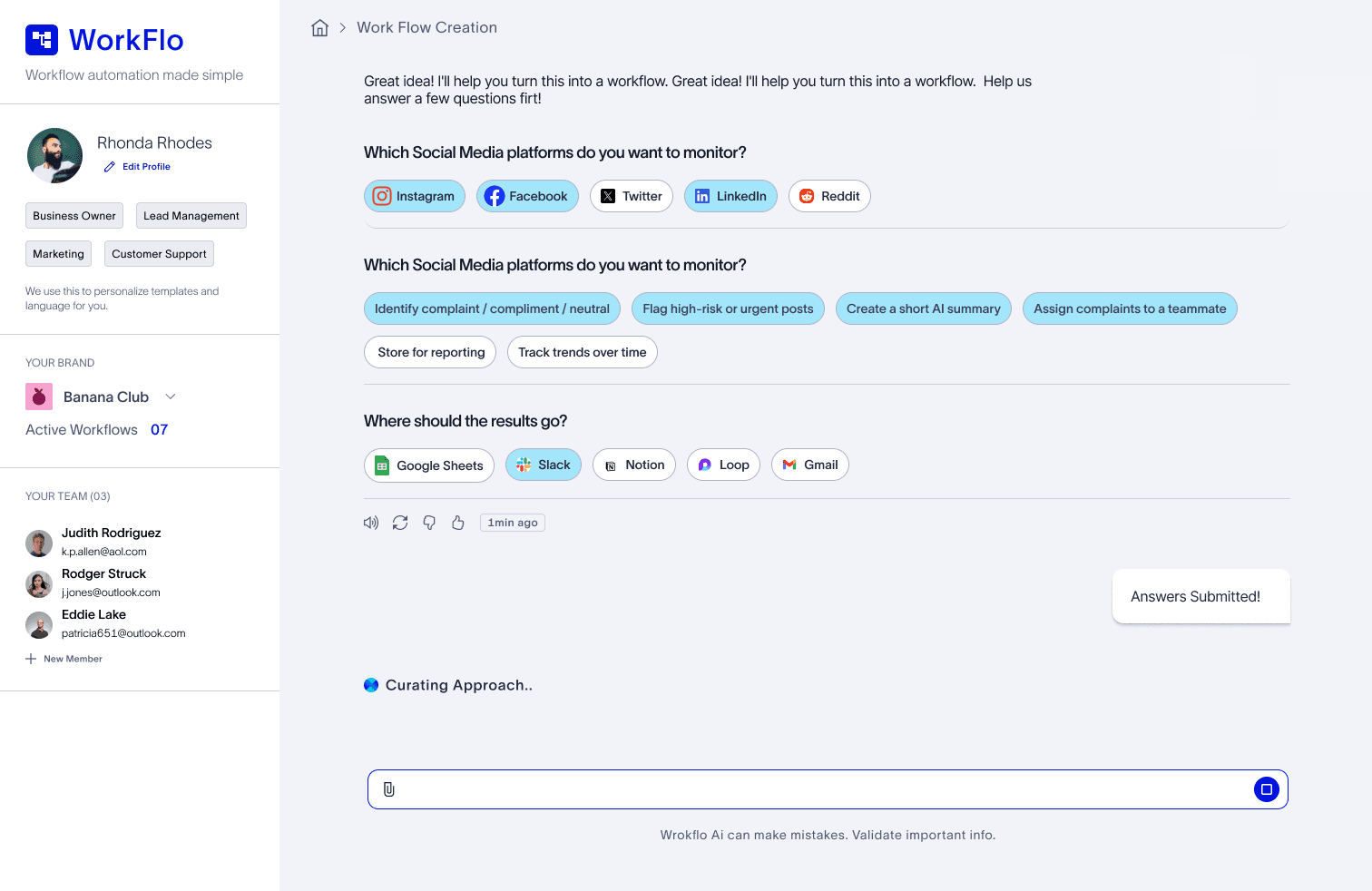
The system asks a few guided questions:
Which platforms?
What should happen to the data?
Where should results go?
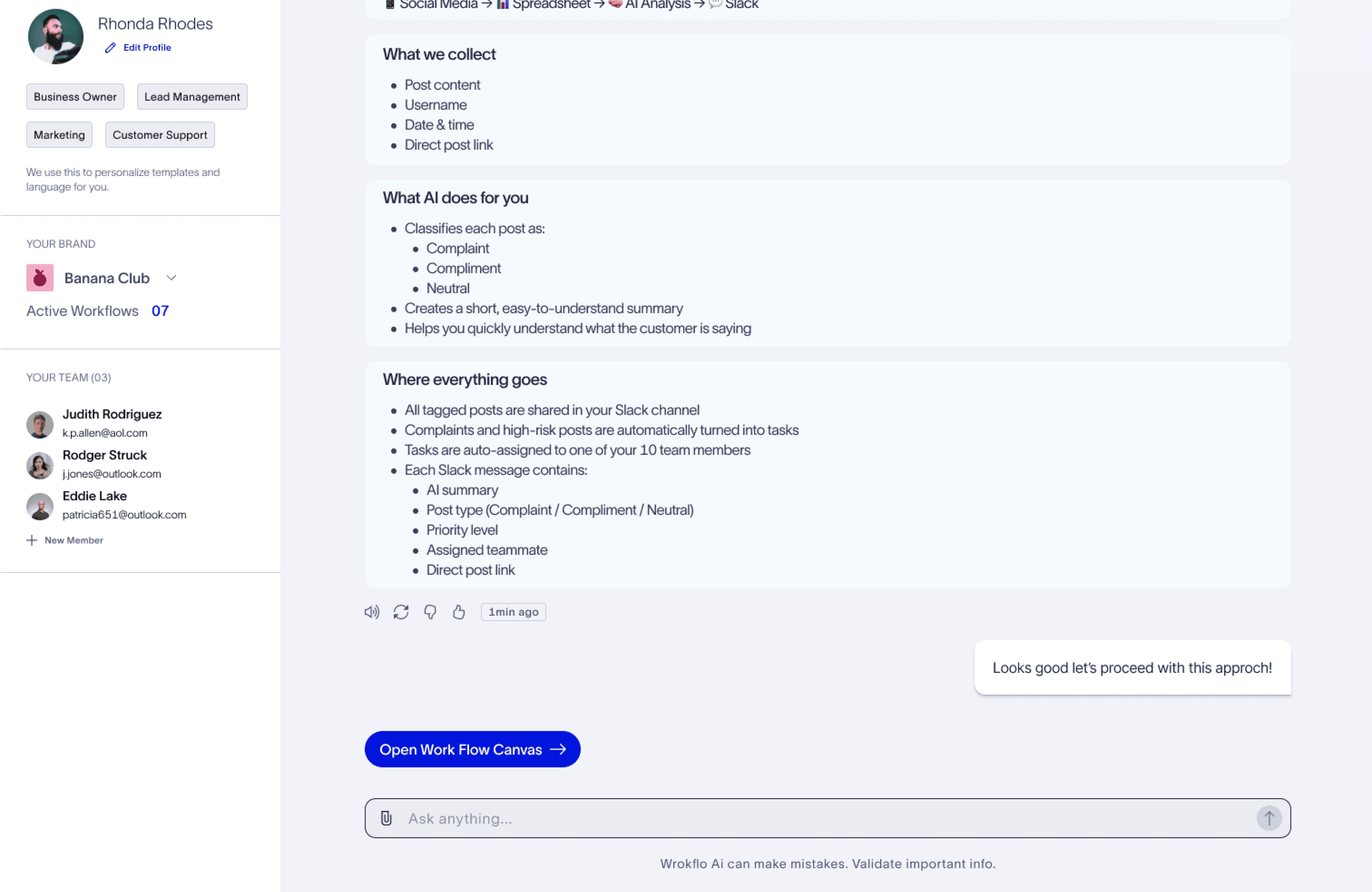
Approach Suggestion
AI suggests 1–2 smart workflow approaches.
One is marked as Recommended.
User chooses: Use this workflow.
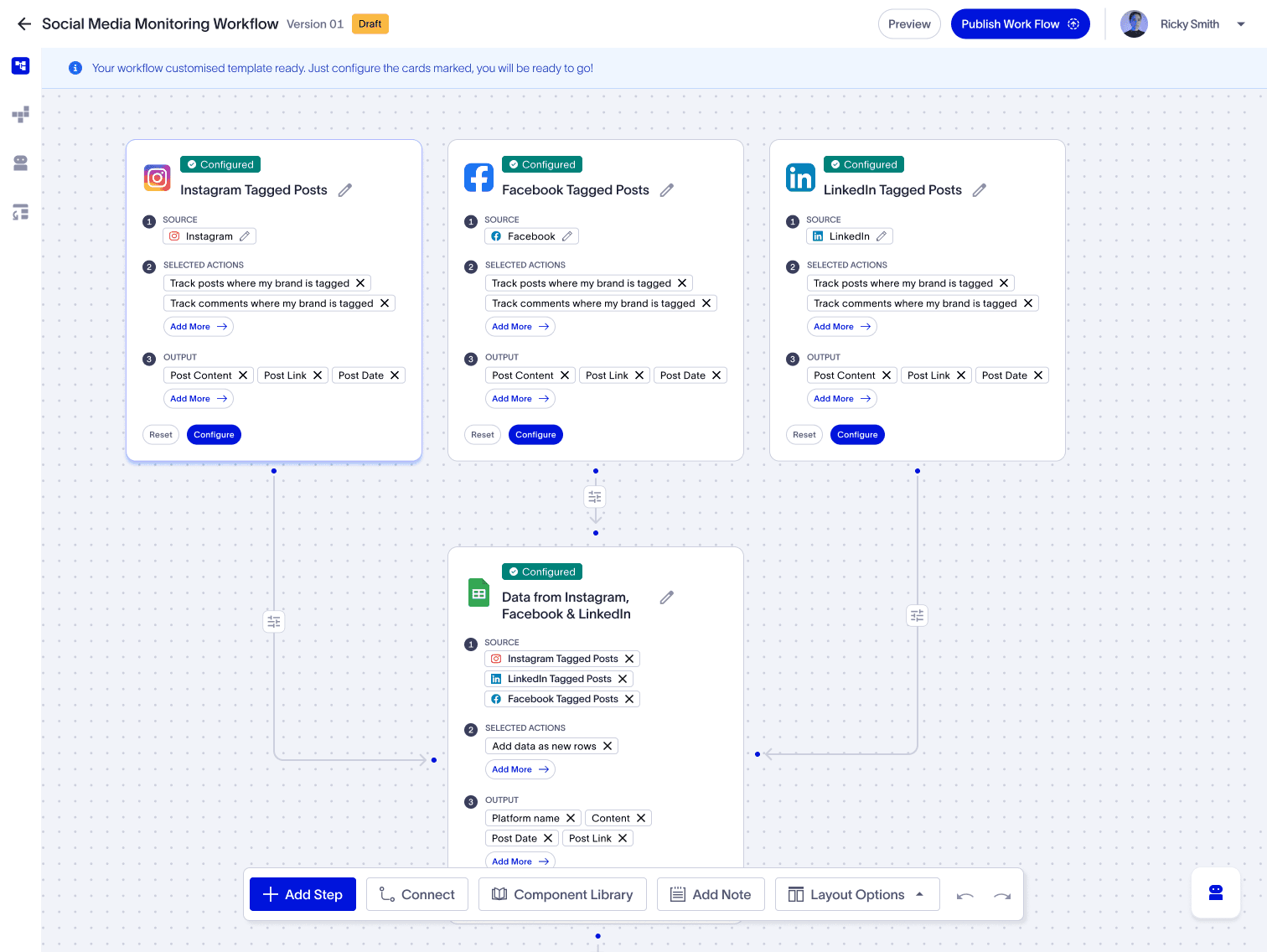
Template Creation
A complete workflow is auto-built using cards.
The user does not start from scratch.
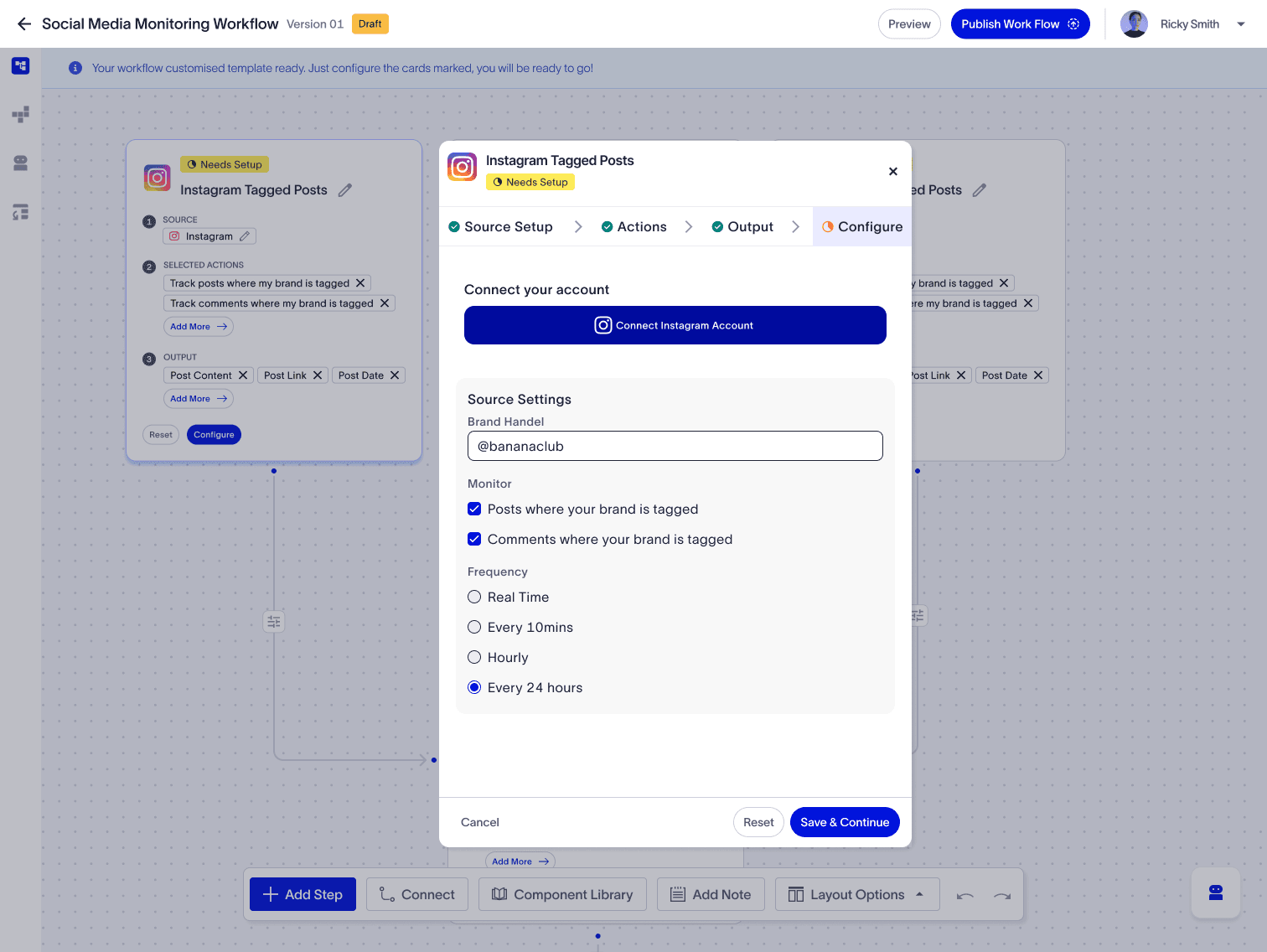
Configuration
User simply connects accounts and reviews settings.
No heavy logic building required.
Problem Input
User describes their need in natural language.
Example: “I want to track posts where my brand is tagged and assign complaints to my team.”
AI Conversation
The system asks a few guided questions:
Which platforms?
What should happen to the data?
Where should results go?
Approach Suggestion
AI suggests 1–2 smart workflow approaches.
One is marked as Recommended.
User chooses: Use this workflow.
Template Creation
A complete workflow is auto-built using cards.
The user does not start from scratch.
Configuration
User simply connects accounts and reviews settings.
No heavy logic building required.
Card System Logic
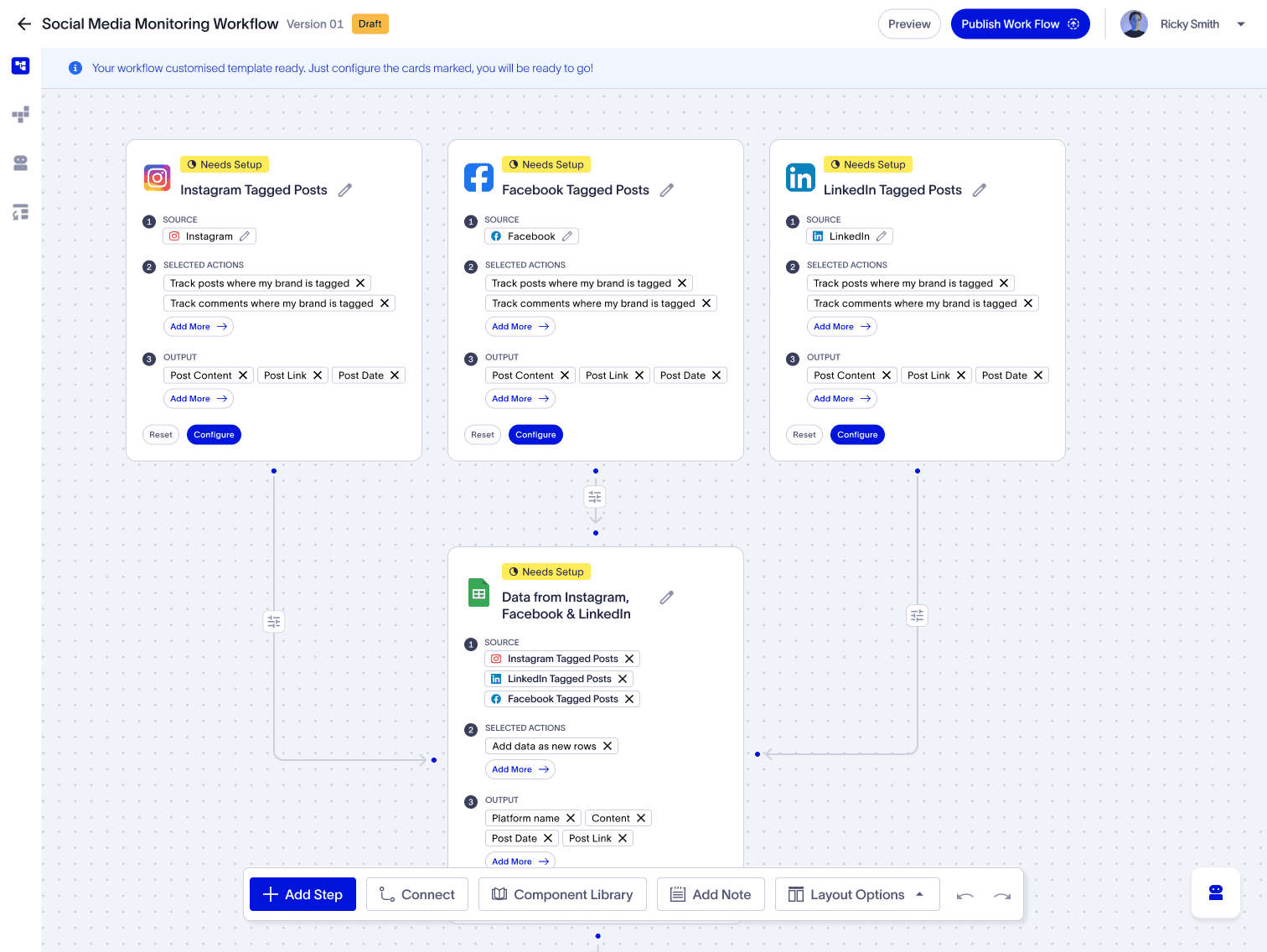
Each workflow is made of visual cards that follow one universal structure:
Source → Action → Output → Configure
Source
Where the data comes from (Instagram, Google Sheets, AI, Slack, etc.)
Action
A generic operation performed on data:
Listen
Store
Analyze
Notify
Assign
Merge
Output
System-generated data fields shown as chips:
Content
Date
Sentiment
Summary
Status
Configure
Only required to:
Connect accounts
Choose channels
Select team members
Each workflow is made of visual cards that follow one universal structure:
Source → Action → Output → Configure
Source
Where the data comes from (Instagram, Google Sheets, AI, Slack, etc.)
Action
A generic operation performed on data:
Listen
Store
Analyze
Notify
Assign
Merge
Output
System-generated data fields shown as chips:
Content
Date
Sentiment
Summary
Status
Configure
Only required to:
Connect accounts
Choose channels
Select team members
Smart Defaults
Actions are selected from predefined lists based on the source
Outputs are auto-populated based on the selected action
Users never type technical logic
They only choose from meaningful, business-driven options
This ensures:
Low error rate
High clarity
Beginner-friendly experience
Actions are selected from predefined lists based on the source
Outputs are auto-populated based on the selected action
Users never type technical logic
They only choose from meaningful, business-driven options
This ensures:
Low error rate
High clarity
Beginner-friendly experience
Why AI Chat?
AI becomes the product’s “UX layer”:
Reduces confusion
Translates intent into structure
Builds confidence
Personalizes templates
Instead of users learning the system, the system learns the user.
AI becomes the product’s “UX layer”:
Reduces confusion
Translates intent into structure
Builds confidence
Personalizes templates
Instead of users learning the system, the system learns the user.
Impact
This approach:
Reduces workflow setup complexity
Cuts decision points by ~50%
Builds trust through preview and testing
Makes automation feel accessible, not technical
This approach:
Reduces workflow setup complexity
Cuts decision points by ~50%
Builds trust through preview and testing
Makes automation feel accessible, not technical
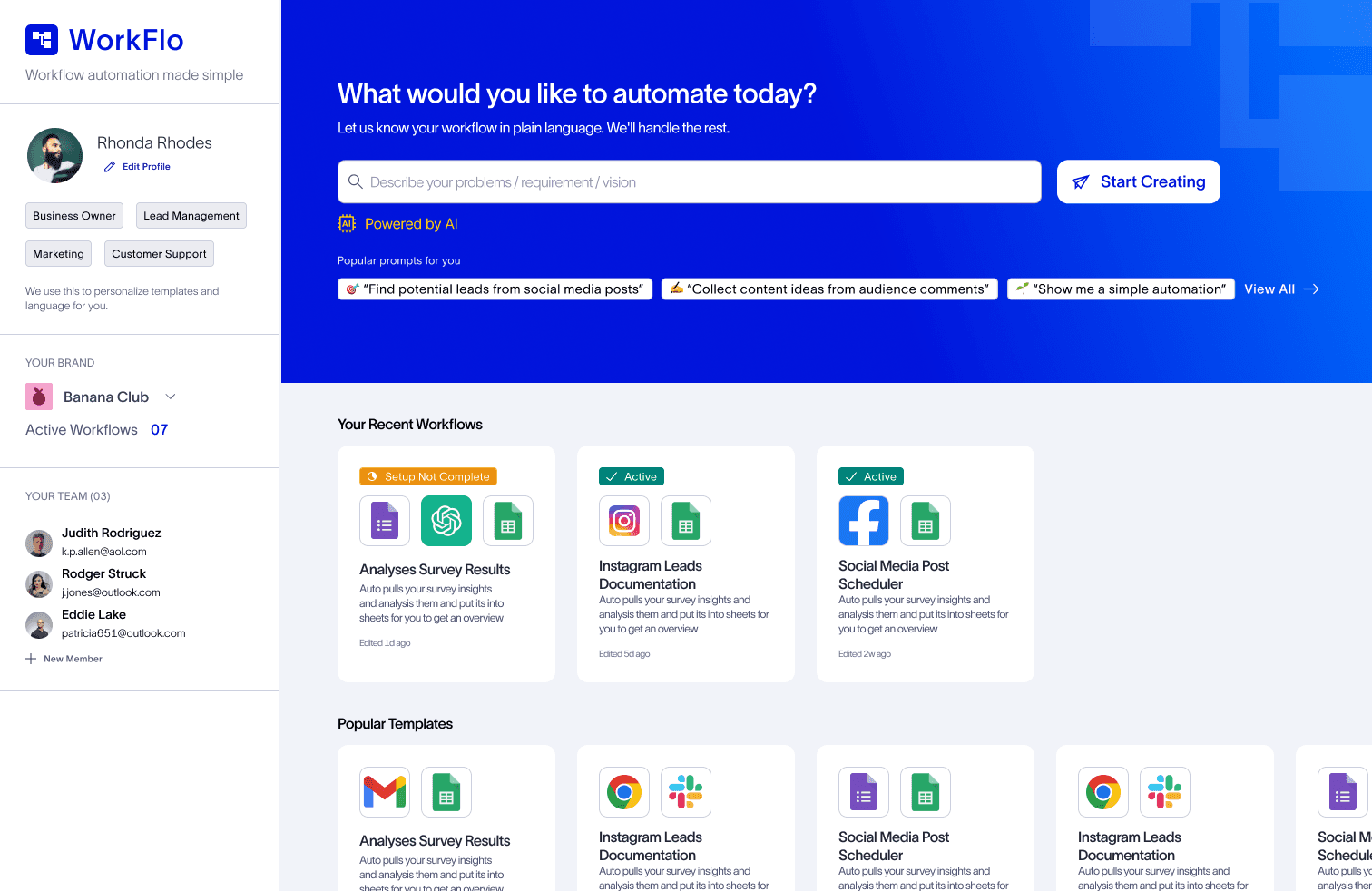
Solution Screens
Thanks
Thanks
For Reading 😃
For Reading 😃
Due to the space constraints, I couldn’t show case all screens, but this solution represents deep thought, structured research, and a significant amount of effort. I hope you enjoy reviewing it
Due to the space constraints, I couldn’t show case all screens, but this solution represents deep thought, structured research, and a significant amount of effort. I hope you enjoy reviewing it