FlowOps
FlowOps
FlowOps
AI Chat based, Template First, Workflow Building Application
AI Chat based, Template First, Workflow Building Application
AI Chat based, Template First, Workflow Building Application
AI UX Design
AI UX Design
Workflow Building
Workflow Building
UX Research
UX Research
AI Interfaces
AI Interfaces
Workflow Automation
Workflow Automation
B2B Product Design
Enterprise UX
UX Research
Dashboard Design
Workflow Automation

Problem Statement
Problem Statement
Problem Statement
Many modern web applications help users create and manage automated workflows. However,
users often struggle with:
Too many configuration steps
Unclear system feedback
Confusing terminology
Low confidence about whether things are set up correctly
Design a simple, intuitive workflow setup experience that helps users
confidently create and activate a workflow.
Many modern web applications help users create and manage automated workflows. However,
users often struggle with:
Too many configuration steps
Unclear system feedback
Confusing terminology
Low confidence about whether things are set up correctly
Design a simple, intuitive workflow setup experience that helps users
confidently create and activate a workflow.
Many modern web applications help users create and manage automated workflows. However,
users often struggle with:
Too many configuration steps
Unclear system feedback
Confusing terminology
Low confidence about whether things are set up correctly
Design a simple, intuitive workflow setup experience that helps users
confidently create and activate a workflow.
Overview
Overview
Overview
Most workflow tools have a steep learning curve. Users struggle with too many configuration steps, technical language, and low confidence about whether their workflow is set up correctly. This often leads to drop-offs before completion.
Most workflow tools have a steep learning curve. Users struggle with too many configuration steps, technical language, and low confidence about whether their workflow is set up correctly. This often leads to drop-offs before completion.
Most workflow tools have a steep learning curve. Users struggle with too many configuration steps, technical language, and low confidence about whether their workflow is set up correctly. This often leads to drop-offs before completion.
1. How I Understand Workflows (Simple Mental Model)
1. How I Understand Workflows (Simple Mental Model)
1. How I Understand Workflows (Simple Mental Model)
Before designing anything, I wanted to be very clear about how workflows work at a fundamental level.
A workflow is simply a series of steps that work together to complete a task.
For example, let’s take a very human task: cooking pasta.
Before designing anything, I wanted to be very clear about how workflows work at a fundamental level.
A workflow is simply a series of steps that work together to complete a task.
For example, let’s take a very human task: cooking pasta.
Before designing anything, I wanted to be very clear about how workflows work at a fundamental level.
A workflow is simply a series of steps that work together to complete a task.
For example, let’s take a very human task: cooking pasta.
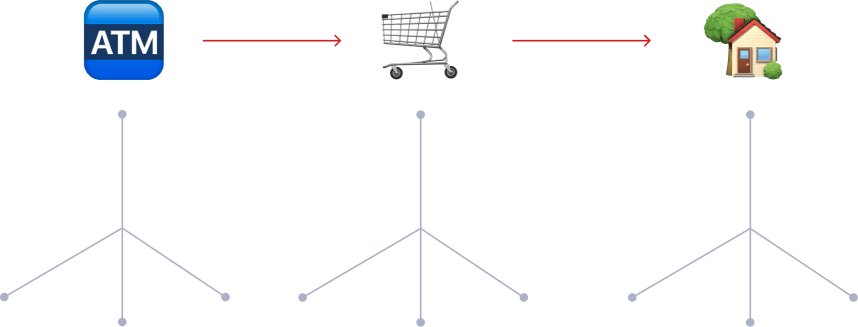
You don’t do it in one step.
Step 1: Go to the ATM and withdraw cash
Step 2: Go to the grocery store and buy ingredients
Step 3: Come home and cook in the kitchen
Each step is different, but together they complete one goal.
This is exactly how workflows work in software
You don’t do it in one step.
Step 1: Go to the ATM and withdraw cash
Step 2: Go to the grocery store and buy ingredients
Step 3: Come home and cook in the kitchen
Each step is different, but together they complete one goal.
This is exactly how workflows work in software
You don’t do it in one step.
Step 1: Go to the ATM and withdraw cash
Step 2: Go to the grocery store and buy ingredients
Step 3: Come home and cook in the kitchen
Each step is different, but together they complete one goal.
This is exactly how workflows work in software
Learnings
Learnings
Learnings
Every step in a workflow can be broken down into three simple parts:
Input – what comes in
Action – what happens to it
Output – what comes out
What’s important is:
The output of one step can becomes the input of the next
A single step can itself be a mini workflow
(like using an ATM: insert card → enter PIN → withdraw cash)
This helped me think in modular building blocks, not complex logic.
Also, the more actions a system supports, the more powerful it becomes—but also more complex.
So the key design challenge is deciding how much power to expose.
Every step in a workflow can be broken down into three simple parts:
Input – what comes in
Action – what happens to it
Output – what comes out
What’s important is:
The output of one step can becomes the input of the next
A single step can itself be a mini workflow
(like using an ATM: insert card → enter PIN → withdraw cash)
This helped me think in modular building blocks, not complex logic.
Also, the more actions a system supports, the more powerful it becomes—but also more complex.
So the key design challenge is deciding how much power to expose.
Every step in a workflow can be broken down into three simple parts:
Input – what comes in
Action – what happens to it
Output – what comes out
What’s important is:
The output of one step can becomes the input of the next
A single step can itself be a mini workflow
(like using an ATM: insert card → enter PIN → withdraw cash)
This helped me think in modular building blocks, not complex logic.
Also, the more actions a system supports, the more powerful it becomes—but also more complex.
So the key design challenge is deciding how much power to expose.
The User I Designed For
The User I Designed For
The User I Designed For
I intentionally designed for one very specific user.
A Gen Z small business owner:
Runs a brand with 2–10 employees
Gets most of their business through social media
Is very active on Instagram, Facebook, and LinkedIn
Their reality:
One person manually checks all social platforms
Reads posts and mentions
Decides what’s a complaint or enquiry
Assigns tasks to the team daily
This is time-consuming, repetitive, and error-prone.
Most importantly:
They don’t understand workflows
They don’t want to learn them
They just want things to run automatically
I intentionally designed for one very specific user.
A Gen Z small business owner:
Runs a brand with 2–10 employees
Gets most of their business through social media
Is very active on Instagram, Facebook, and LinkedIn
Their reality:
One person manually checks all social platforms
Reads posts and mentions
Decides what’s a complaint or enquiry
Assigns tasks to the team daily
This is time-consuming, repetitive, and error-prone.
Most importantly:
They don’t understand workflows
They don’t want to learn them
They just want things to run automatically
I intentionally designed for one very specific user.
A Gen Z small business owner:
Runs a brand with 2–10 employees
Gets most of their business through social media
Is very active on Instagram, Facebook, and LinkedIn
Their reality:
One person manually checks all social platforms
Reads posts and mentions
Decides what’s a complaint or enquiry
Assigns tasks to the team daily
This is time-consuming, repetitive, and error-prone.
Most importantly:
They don’t understand workflows
They don’t want to learn them
They just want things to run automatically
My Design Principles
My Design Principles
My Design Principles
So I designed with these principles:
No learning curve
Simple, human language
AI does the thinking
User only makes decisions, not logic
I wanted to build a Canva-like experience for workflows.
So I designed with these principles:
No learning curve
Simple, human language
AI does the thinking
User only makes decisions, not logic
I wanted to build a Canva-like experience for workflows.
So I designed with these principles:
No learning curve
Simple, human language
AI does the thinking
User only makes decisions, not logic
I wanted to build a Canva-like experience for workflows.
Solution - Step 1
Solution - Step 1
Solution - Step 1
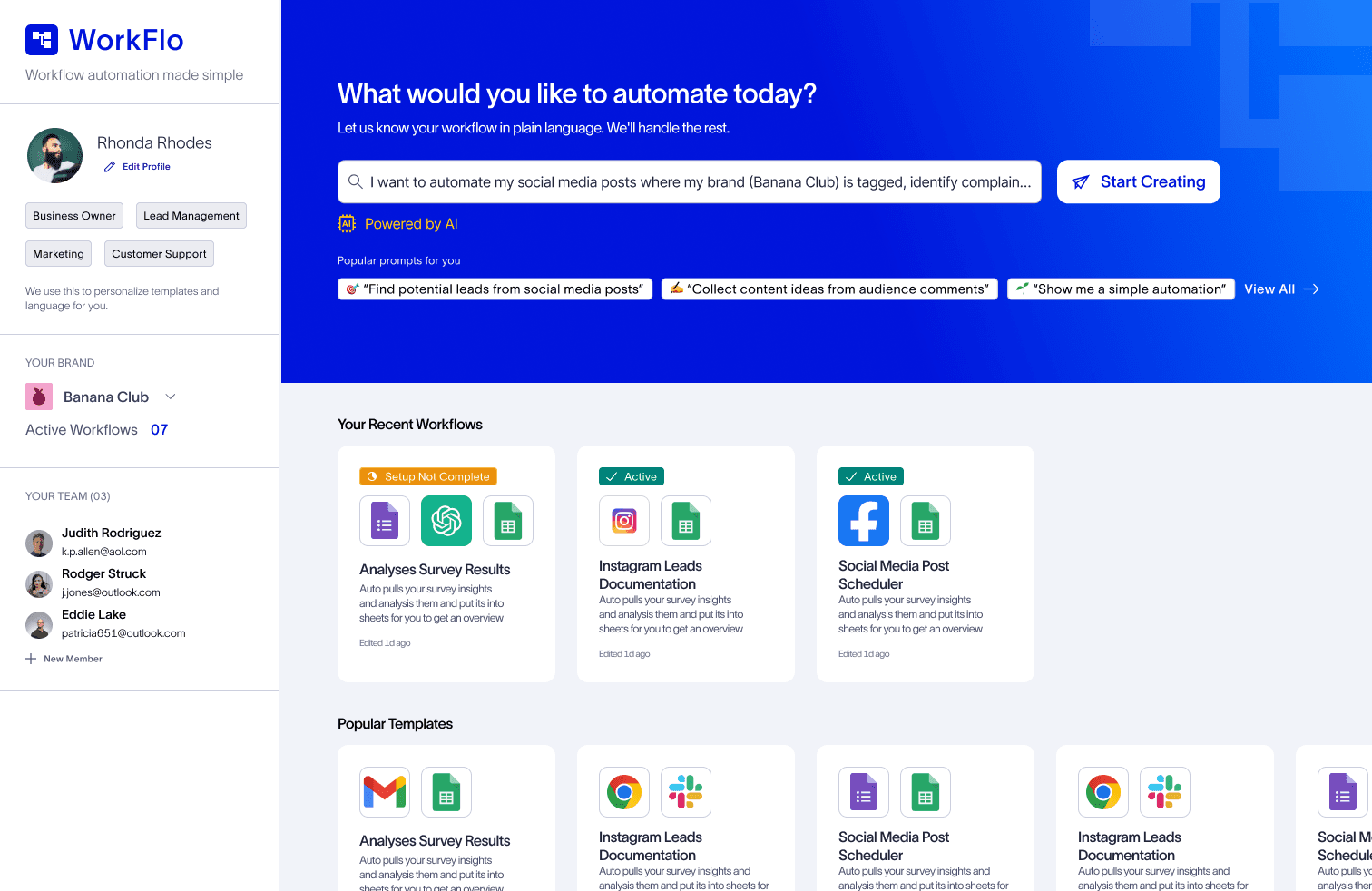
Start with Intent, Not Configuration
The user starts by describing their problem in plain English:
“I want to automate my social media posts where my brand (Banana Club) is tagged, identify complaints, and assign my teammate to resolve them.”
No forms. No rules. Just intent.
Start with Intent, Not Configuration
The user starts by describing their problem in plain English:
“I want to automate my social media posts where my brand (Banana Club) is tagged, identify complaints, and assign my teammate to resolve them.”
No forms. No rules. Just intent.
Start with Intent, Not Configuration
The user starts by describing their problem in plain English:
“I want to automate my social media posts where my brand (Banana Club) is tagged, identify complaints, and assign my teammate to resolve them.”
No forms. No rules. Just intent.
Solution - Step 2
Solution - Step 2
Solution - Step 2
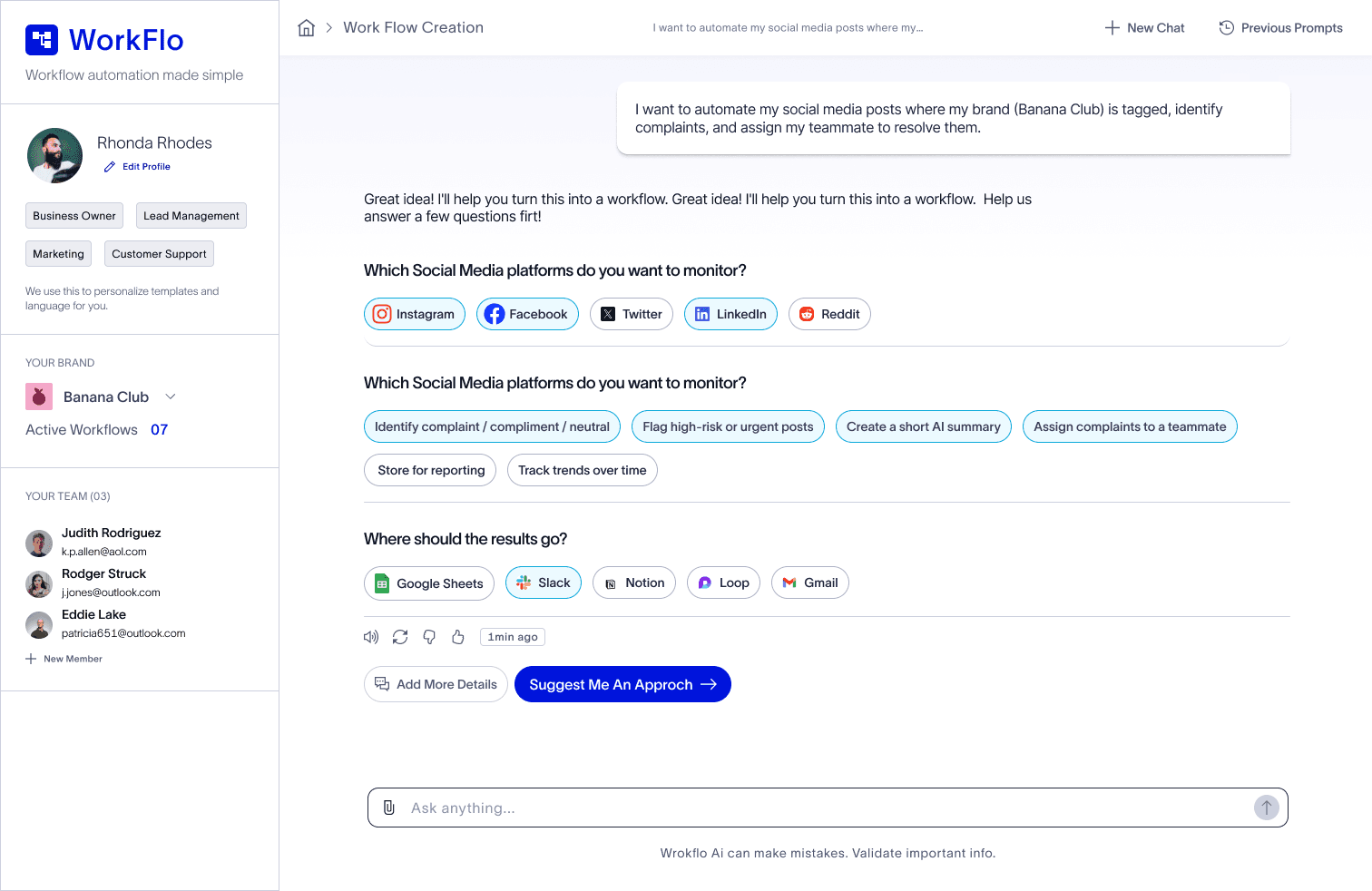
The AI asks a few guided, non-technical questions:
Which platforms should we scan?
What do you want to do with the data?
Where should the output go?
The user simply checks options—no typing, no logic.
The AI asks a few guided, non-technical questions:
Which platforms should we scan?
What do you want to do with the data?
Where should the output go?
The user simply checks options—no typing, no logic.
The AI asks a few guided, non-technical questions:
Which platforms should we scan?
What do you want to do with the data?
Where should the output go?
The user simply checks options—no typing, no logic.
Solution - Step 3 AI Suggests an Approach
Solution - Step 3 AI Suggests an Approach
Solution - Step 3 AI Suggests an Approach
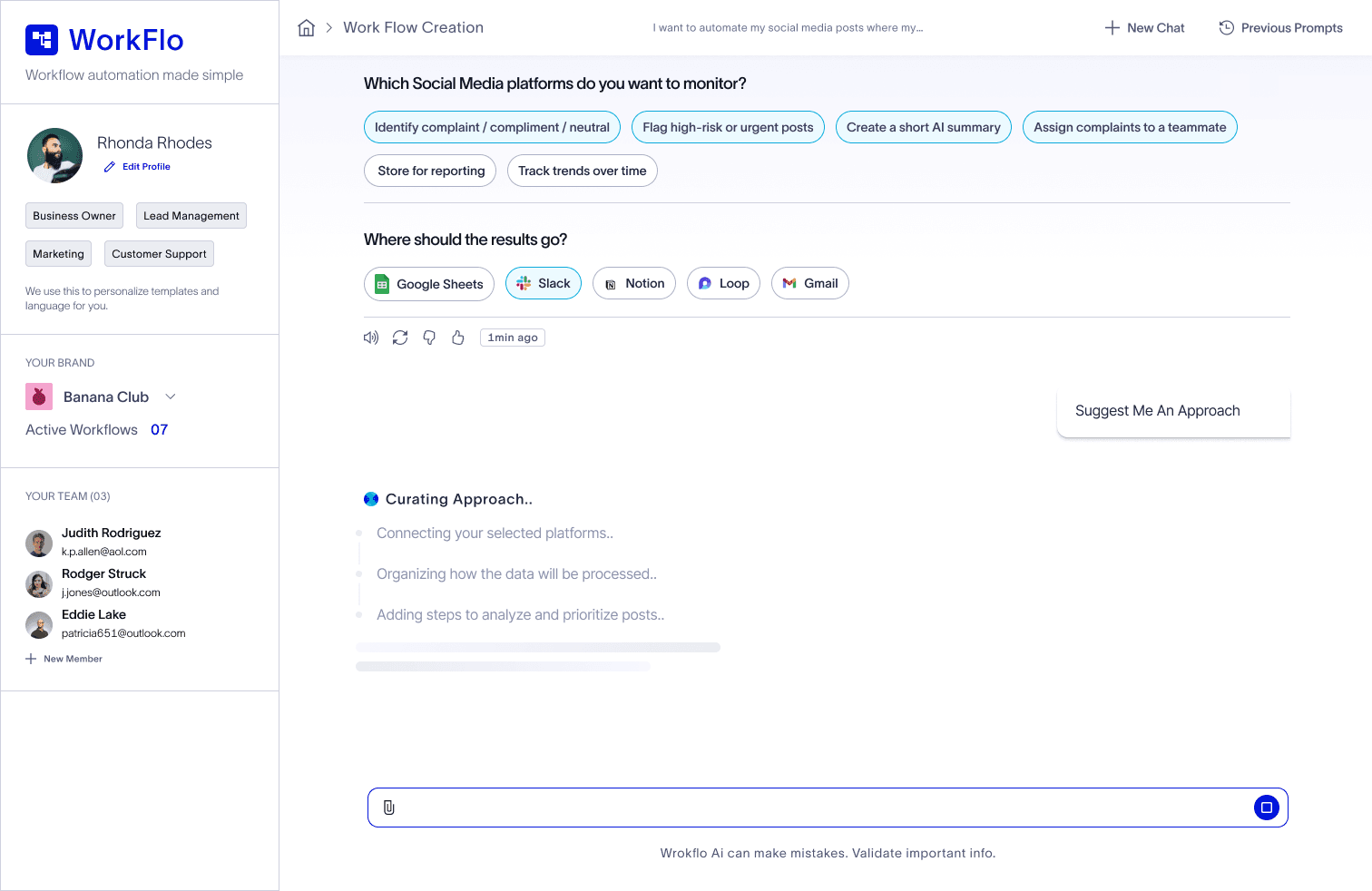
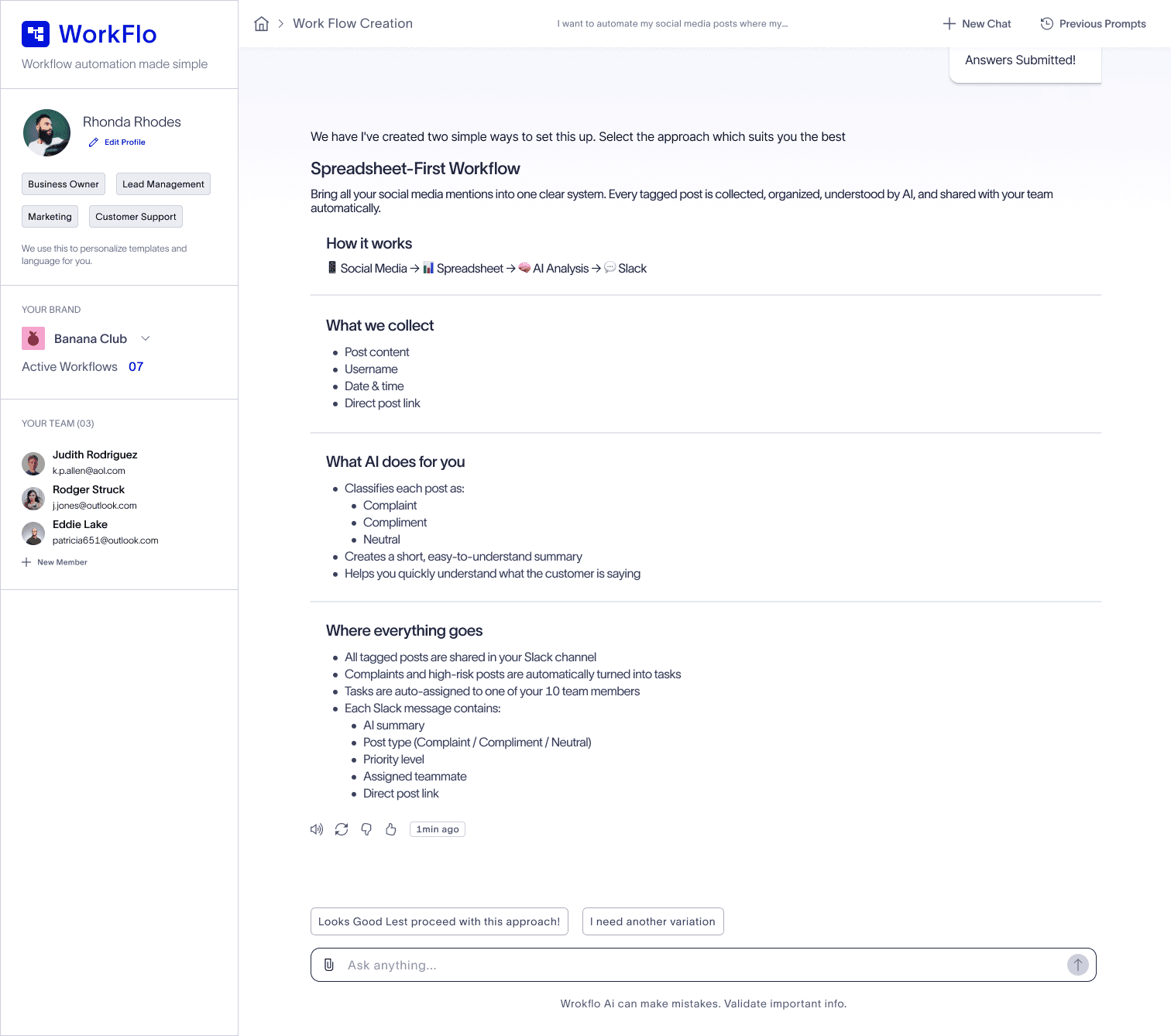
Based on the answers, the system:
Suggests a workflow approaches
Explains why each approach works
Recommends the best one
If the user likes it, they click Generate workflow.
At this point, most of the hard work is already done.
Based on the answers, the system:
Suggests a workflow approaches
Explains why each approach works
Recommends the best one
If the user likes it, they click Generate workflow.
At this point, most of the hard work is already done.
Based on the answers, the system:
Suggests a workflow approaches
Explains why each approach works
Recommends the best one
If the user likes it, they click Generate workflow.
At this point, most of the hard work is already done.
High-Level Flow
High-Level Flow
High-Level Flow
Why Templates Were Critical
A big insight was:
Most users can’t visualize workflows.
They don’t know:
What is input?
What is action?
What is output?
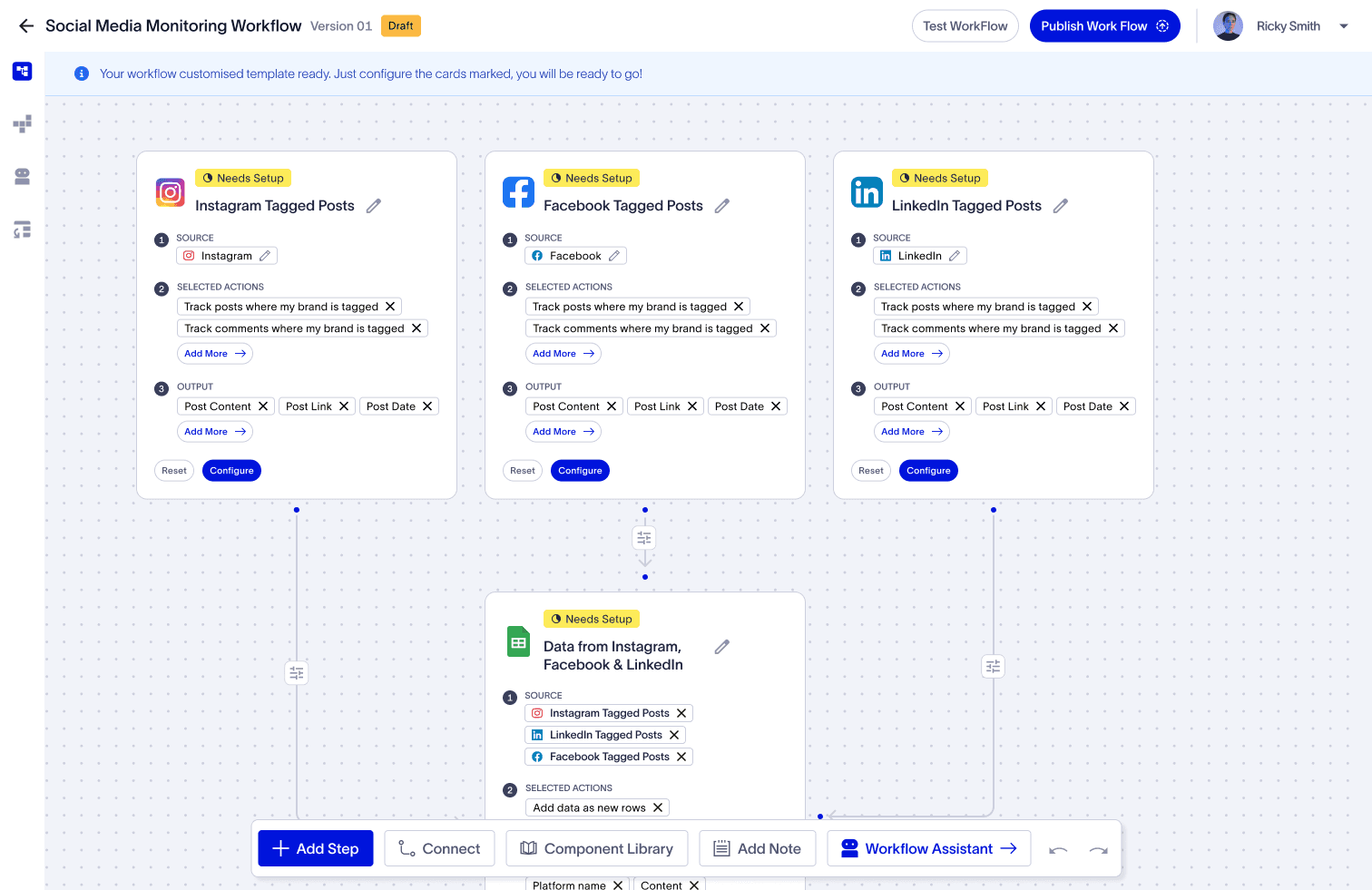
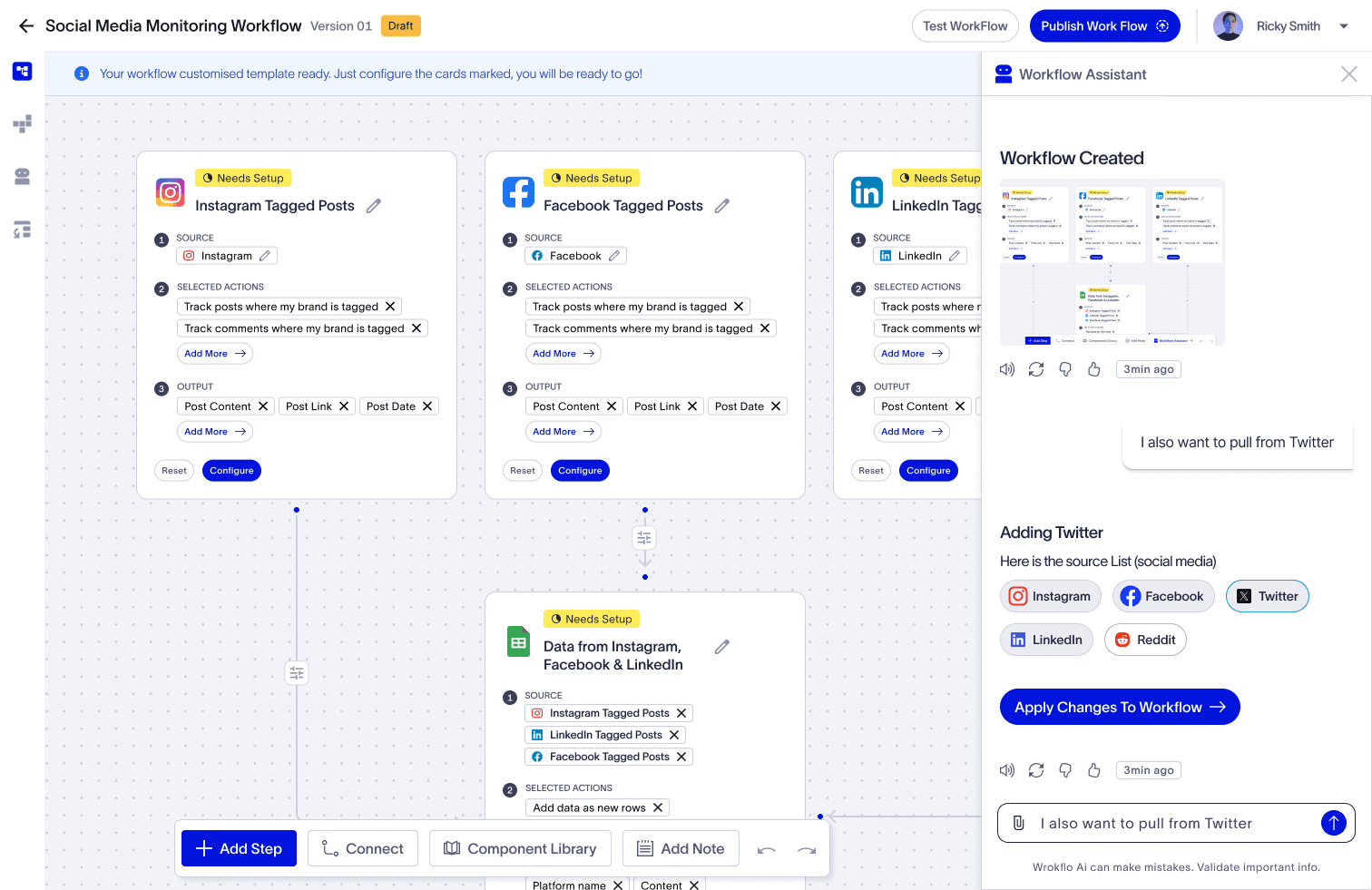
Starting with a personalized template:
Makes the flow visible
Reduces fear
Reduces setup friction by ~60%
Helps users understand how things connect
Generic templates don’t work well because:
Users don’t know which one to pick
Customizing them feels intimidating
Personalized, AI-generated templates solve this.
Why Templates Were Critical
A big insight was:
Most users can’t visualize workflows.
They don’t know:
What is input?
What is action?
What is output?
Starting with a personalized template:
Makes the flow visible
Reduces fear
Reduces setup friction by ~60%
Helps users understand how things connect
Generic templates don’t work well because:
Users don’t know which one to pick
Customizing them feels intimidating
Personalized, AI-generated templates solve this.
Why Templates Were Critical
A big insight was:
Most users can’t visualize workflows.
They don’t know:
What is input?
What is action?
What is output?
Starting with a personalized template:
Makes the flow visible
Reduces fear
Reduces setup friction by ~60%
Helps users understand how things connect
Generic templates don’t work well because:
Users don’t know which one to pick
Customizing them feels intimidating
Personalized, AI-generated templates solve this.
Key Learnings
Key Learnings
Key Learnings
Actions should always be relevant to the input data.
A system might support 1000 actions,
but for a given input, only ~20 make sense.
So instead of exposing everything, I focused on:
Limited inputs
Limited, meaningful actions
High confidence outcomes
Actions should always be relevant to the input data.
A system might support 1000 actions,
but for a given input, only ~20 make sense.
So instead of exposing everything, I focused on:
Limited inputs
Limited, meaningful actions
High confidence outcomes
Actions should always be relevant to the input data.
A system might support 1000 actions,
but for a given input, only ~20 make sense.
So instead of exposing everything, I focused on:
Limited inputs
Limited, meaningful actions
High confidence outcomes
Vision
Vision
Vision
In most tools:
Users use 20% of features 80% of the time
Canva identified those 20% and built an entire product around them.
My goal was similar:
Identify the 20% of workflow actions people use most
and make workflow creation as simple as Canva.
In most tools:
Users use 20% of features 80% of the time
Canva identified those 20% and built an entire product around them.
My goal was similar:
Identify the 20% of workflow actions people use most
and make workflow creation as simple as Canva.
In most tools:
Users use 20% of features 80% of the time
Canva identified those 20% and built an entire product around them.
My goal was similar:
Identify the 20% of workflow actions people use most
and make workflow creation as simple as Canva.
Thanks
Thanks
Thanks
For Reading 😃
For Reading 😃
For Reading 😃
Due to the space constraints, I couldn’t show case all screens, but this solution represents deep thought, structured research, and a significant amount of effort. I hope you enjoy reviewing it
Due to the space constraints, I couldn’t show case all screens, but this solution represents deep thought, structured research, and a significant amount of effort. I hope you enjoy reviewing it
Due to the space constraints, I couldn’t show case all screens, but this solution represents deep thought, structured research, and a significant amount of effort. I hope you enjoy reviewing it